

Sign-in
Use this page to manage how you sign in to Vivlab: your email address, password, passkeys and signed-in sessions. A passkey lets you sign in with your device's fingerprint reader, face recognition or PIN. A session is a connection to your account on a browser or device.
Come here whenever you want to change your password, add a faster sign-in method like a passkey, check which provider (Google or email) you use to identify yourself, or review the devices signed in to your account and sign out any you don't recognize.
Sign-in identity
This section shows the email address linked to your account as well as the method used to sign in: Google sign-in if your account is linked to Google, or Email sign-in otherwise.
Caution
The sign-in email address is locked: it cannot be edited from the interface. If you need to change it (business takeover, change of staff, typo at creation…), contact support directly.
Password
Lets you replace the password you use to sign in. This section only appears if your account was created with an email address, accounts connected via Google manage their password directly with Google.
Click Edit my password, fill in your Current password, type then confirm the New password (8 characters minimum), and confirm with Validate.
The change automatically signs you out from all your other active sessions: it's the fastest way to secure your account if you suspect it has been compromised.
Passkeys
A passkey lets you sign in with your biometrics (fingerprint, face), the device's PIN or a physical security key, without typing your password. It's the fastest and most secure sign-in method.
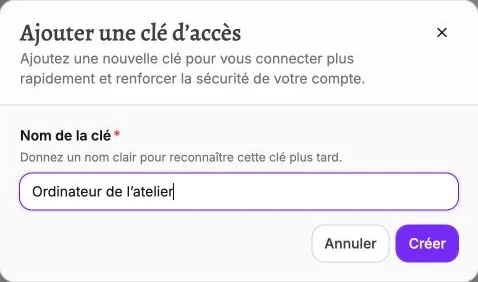
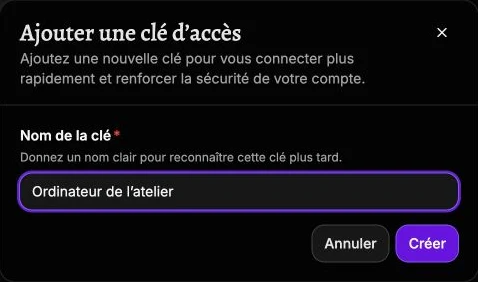
The Registered keys list shows your existing keys with the date they were added; the Delete button removes the ones you no longer use. Click Manage my passkeys to add a new one from the device you're using: give it a clear Key name (for example "Personal iPhone") then confirm with Create.
Sessions
Lists every device currently signed in to your account, with for each one the browser and system (Device), the sign-in city (Location), the sign-in date (Signed in) and the Last activity. Your current device is marked with the Current badge.
Review this list whenever you suspect unauthorized access: if a device or a location doesn't ring a bell, click Sign out on that row to close the session immediately. To close everything at once without touching your current session, use Sign out other devices. Also consider changing your password if the access looks fraudulent.
Use Sign out when you finish your session on a shared workstation or a computer that isn't yours.