Product theme
This page controls the appearance of the product page, that is the template used to display each individual product. This template is shared by your entire catalog: a single edit updates the presentation of all your products. The Preview on the right updates as you make changes. Switch between Desktop and Mobile to check both versions.
Come here when you want to align the product page with your visual identity, change the ready-made template, or customize the add-to-cart button by product type (physical product, digital product, subscription, event).
Your changes are saved in one go with Save at the top of the page, or discarded with Cancel.
The dashboard is shown in French, with English captions.
Read the video steps
- — Preview the theme with an active product and its photo.
- — Open the theme selector.
- — Select the Mara theme.
- — The Mara theme is selected.
- — Try the Musca theme.
- — Save the selected theme.
- — The theme is saved. Reload the page to load its preview.
- — After reloading, Musca remains selected and its preview is displayed.
Preview product
This section picks the product used for the preview and sets the global options of the page theme: predefined template, out-of-stock label and background and text colors.
Pick a Sample product to show the page preview: only active products are offered and the first one is preselected when the page opens. Without any product in your catalog, the preview shows "No product to display".
Pick a Theme to apply a coherent template (layout of images, title, variants and description): besides the default theme, nine named themes are available (Mara, Musca, Bale, Lyra, Rosa, Pico, Orion, Nova and Carbon).
Fill in Out of stock, the label shown when the product is no longer available (for instance "Being restocked"). Set the Background and the Text color to ensure a readable contrast with your visuals.
Button labels
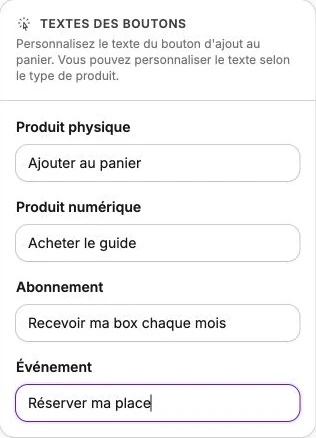
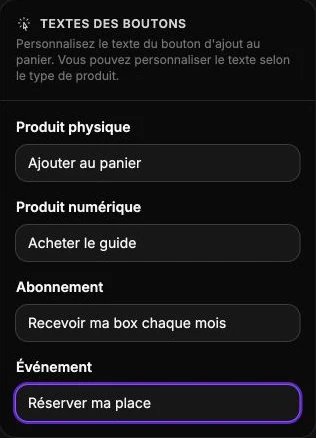
The add-to-cart button doesn't say the same thing depending on what is sold: "Add to cart" works for a physical product, but "Download" or "Subscribe" speak louder for a digital product or a subscription. This section lets you adapt the text by product type.
Enter the text shown for each of the four types: Physical product, Digital product, Subscription and Event. The right wording reassures the visitor by confirming the nature of the purchase before they click.