

Inner spacing
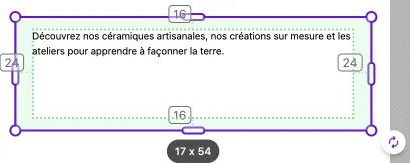
When a block is selected, its inner margins (padding) are highlighted in green and a handle appears on each side that already has a margin. Grab it to adjust that margin directly on the canvas, without having to go through the style panel.
A side at 0 shows no handle: give it a first value from the style panel, then fine-tune it on the canvas.
Edit a single side
Drag a handle inward to increase the margin on that side, or outward to reduce it (down to 0). Each side is set independently:
- Top: space between the content and the top of the block.
- Right: space on the right.
- Bottom: space at the bottom.
- Left: space on the left.
Values are rounded to the nearest pixel.
See the values
Each handle permanently shows its side's value in pixels. You can therefore set a spacing precisely (for example 24 px) without having to type it into the style panel.
Border and padding
If the block has a border, the padding handles stay inside the border: the margin is calculated between the content and the border, not between the content and the outer edge of the block.
Sync with the style panel
The values adjusted here are immediately reflected in the Inner spacing subsection of the style panel, and vice versa. Both methods edit the same value, so use whichever is more convenient depending on context.