

Product catalog
The Product catalog element displays a grid of products from your e-commerce catalog. Each card presents the product's image, name and price, and leads to its full product page on click. Unlike the Product on sale element, which features a chosen by you item, the grid fills itself from the filters in the Search subsection.
A grid arranges products in rows and columns. Its filters decide which products appear; changing the grid's appearance does not edit the product descriptions or prices.
Search
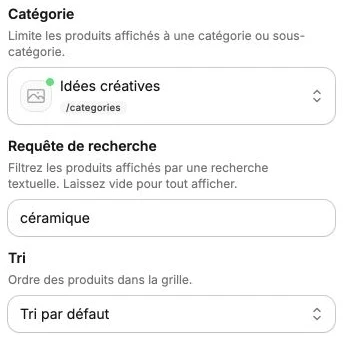
The Search subsection determines which products appear in the grid:
- Category: limits the displayed products to a category or subcategory of your store. The selector lists your categories with their full path (for example "Shop > Women > Dresses"). Leave the field empty to draw from the whole catalog.
- Search query: filters the products with a text search, the way a visitor would in the search bar. Leave empty to show all.
- Sort: the order of products in the grid. Four options: Default sort, Update date (recent), Creation date (recent) and Manual order, which follows the order set via Reorder in the Products.
Grid
- Number of products: the maximum number of products displayed, from 1 to 100.
- Columns: the number of products per row, from 1 to 6. Set it separately for desktop and mobile; without a setting, the grid shows 4 columns on desktop and 2 on mobile.
- Horizontal spacing: the gap between columns, in pixels.
- Vertical spacing: the gap between rows, in pixels.
Product style
The Product style subsection adjusts the look of the cards, applied to every product in the grid:
- Image ratio: forces a fixed ratio for the product images (1/1, 5/4, 7/5, 3/2 or 16/9). Images are then cropped to fill their frame, which keeps the grid regular even when your photos have different dimensions. When disabled, each image is shown whole in a square frame.
- Predefined roundings: the corner radius of the product visuals, from None to Full, with the same settings as the Rounded corners subsection: a global radius with a slider, or a different radius per corner via Edit each corner.
Style
The style panel gathers the text style (product names and prices), background, borders, corner radius, shadow, inner margins, vertical alignment, visibility and transitions.