

Border
Use Border to draw a line around an element. Choose the line's style, thickness and color, and the sides where it appears.
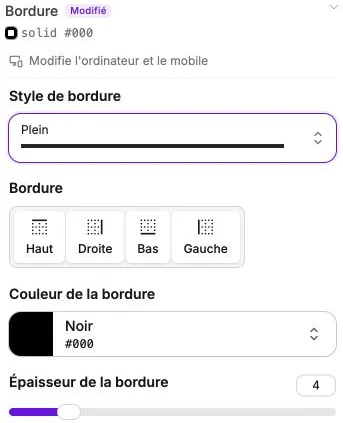
Border style
The Border style selector offers four styles:
- Solid: continuous line (the most common).
- Dotted: small aligned dots.
- Dashed: small spaced dashes.
- Double: two parallel lines.
Until the style is chosen, the other settings stay hidden.
Border (sides to border)
Once the style is chosen, select the sides to border (Top, Right, Bottom, Left). Click on a side to enable or disable it. You can enable one, two, three or all four sides.
This is how you create, for example, a separator at the bottom of a card (only the Bottom side enabled), or a full frame (all four sides).
Border color
Standard color picker. The colors of your theme appear as shortcuts.
Border thickness
Slider between 1 and 20 pixels. A value of 1 gives a thin line, 4 a visible line, beyond that a very pronounced frame.
Reset
The Reset settings button clears the border (style, color, thickness, enabled sides) in one action.