

Shadow
Use Shadow to add a shadow around an element and make it stand out from the background. Start with one of the six presets, then adjust each setting if needed.
X offset moves the shadow sideways; Y offset moves it up or down. Blur softens its edges. Spread makes the shadow larger or smaller around the element.
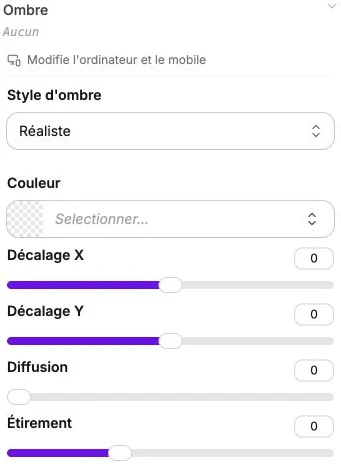
Shadow style
The Shadow style selector offers six presets:
- Realistic: soft, gradient shadow, like a real cast shadow.
- Flat: sharp shadow with no blur, in a graphic style.
- Small: light shadow, ideal for resting cards.
- Medium: standard shadow, legible and discreet.
- Large: pronounced shadow, to make a key element stand out.
- Extra large: very strong shadow, for a strong elevation effect.
Choosing a preset automatically configures the parameters below, which you can then refine.
Color
Standard color picker for the shadow's hue. The colors of your theme appear as shortcuts. For a subtle shadow, keep black with low opacity.
X and Y offset
- X offset (between -300 and 300 px): moves the shadow to the right (positive) or to the left (negative).
- Y offset (between -300 and 300 px): moves the shadow downward (positive) or upward (negative).
A shadow with Y positive and X = 0 simulates a light coming from above, which is the most natural rendering.
Blur
Blur slider (between 0 and 500 px). The greater the value, the blurrier and softer the shadow. A blur of 0 gives a sharp shadow in a "flat" style.
Spread
Spread slider (between -100 and 200 px). Extends the shadow beyond its offset (positive value) or shrinks it (negative value). Used for halo or highlight effects.
Reset
The Reset settings button completely clears the shadow.