

Countdown
The Countdown element shows the time left until a date you pick. Its values are padded to at least two digits, separated by ":", and displayed above their unit labels (days, hours, minutes, seconds). Once the date is reached, the countdown gives way to the end message.
Use it to give a limited offer a clear deadline or to announce an opening, a collection launch or the start of an event. You can insert it on a page or in a pop-up.
The countdown lives in the Add an element panel, Text category.
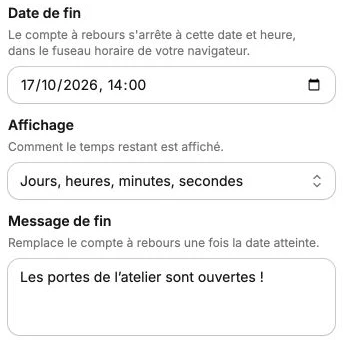
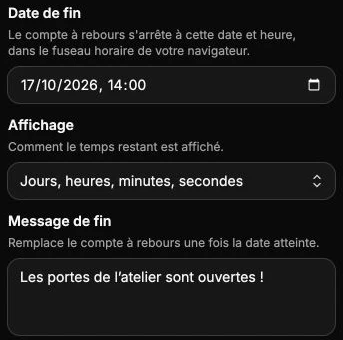
Countdown settings
- End date: the day and time at which the countdown stops (seven days after you add it by default). You cannot pick a past date. The date is entered in your browser's time zone, then saved as a precise instant, so all visitors see the countdown end at the same moment.
- Display: With days (by default, days, hours, minutes and seconds) or Hours only (hours, minutes and seconds). In the second case the remaining days are rolled into the hours, which can then exceed two digits.
- End message: the text that replaces the countdown once the date is reached ("Time's up!" by default). It reuses the digits' typography and is automatically translated with the page on publication.
Unit labels are not typed in: they are generated automatically in the site's displayed language. If a visitor reads a translated version, they read "days / hours" or "Tage / Stunden" without you having entered anything.
Digits
The Digits section sets the appearance of the values:
- Digit colour
- Digit weight: from 100 to 900, in steps of 100.
- Digit font: a font from your theme, or a font you upload.
The digits' size is set in the text style of the style panel: it drives the size of the whole block.
Unit labels
The Unit labels section offers the same settings (colour, weight, font) for the words placed under the digits. Their size follows the digits: they show in spaced small capitals, at a quarter of the values' size.
Countdown style
The style panel groups the text style (including the digits' size), positioning, background, inner spacing, border and its corner radius, shadow, per-device visibility and animations.
Check the rendering before publishing
On the canvas, the countdown ticks with the real time: you immediately see whether enough time is left for the block to make sense. If the date has already passed, the end message shows instead.